
Does Your Agency Invoice Match What Google Ads Actually Spent? File Scout + Insights IQ Can Now Tell You
Your agency sends an invoice. Google Ads shows what actually spent. File Scout + Insights IQ now lets you compare both — and ask questions across all your data in one place.
%20(1).png)


Key Takeaways
- File Scout lets you upload any spreadsheet, report, or PDF directly into Dealer Insights
- Insights IQ can now answer questions that combine your uploaded data with vendor spend, Google Ads, GA4, organic search, and inventory data
- Files are processed using AI — column types are auto-detected, descriptions are auto-generated, and the system learns what each file contains
- Insights IQ automatically finds the right file for the right question — no manual routing or file management required
- Works with .csv, .xlsx, .xls, .tsv, .docx, and .pdf files up to 25 MB
You have two kinds of data about your dealership.
There's the data that lives in your marketing stack — Google Ads spend, GA4 sessions, vendor costs, VDP views, keyword performance, organic search impressions. Dealer Insights has always been the place where that data gets organized, analyzed, and held accountable.
Then there's the data that lives in spreadsheets and PDFs on someone's desktop. The BDC performance report your manager pulls every Monday. The OTT campaign breakdown your TV vendor emails at the end of each month. The agency invoice that itemizes what you paid for SEM versus VLA versus display. The custom sales analysis your 20-group requires each quarter.
These two sets of data have never been in the same conversation. Until now.
Introducing File Scout
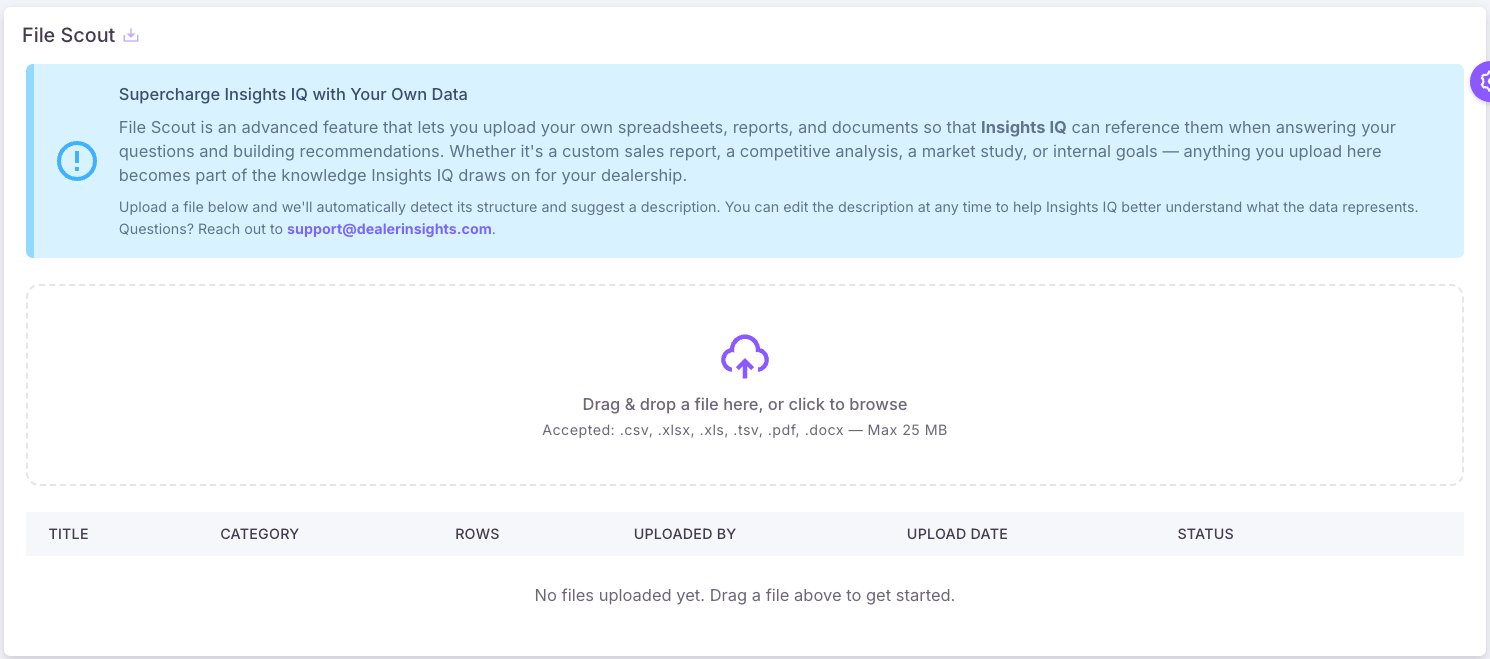
File Scout is a new feature in Dealer Insights that lets you upload your own spreadsheets, reports, and documents directly into your account. Once uploaded, Insights IQ — our AI assistant — can reference that data when answering your questions, alongside everything it already knows about your vendors, campaigns, and website performance.
What This Actually Looks Like
The most useful way to understand File Scout is to see the questions it makes possible.
OTT and connected TV vendors typically send reports as PDFs breaking down impressions and reach by day of week — not a format you can easily compare against anything. With File Scout, you upload that PDF and ask Insights IQ: "Is there a correlation between the days our OTT impressions were highest and our VDP views or website leads?" Insights IQ reads the vendor's PDF and your GA4 data together and tells you whether the TV spend is moving the needle on your website — something that previously required a spreadsheet analyst and a few hours.
Agency invoices are another common example. Most agencies send a monthly invoice that breaks out spend by campaign type — SEM, VLA, display, social. Upload that invoice and ask: "Does what we were invoiced for SEM and VLA match what Google Ads actually shows we spent?" Insights IQ compares the invoice figures against the raw spend data it pulls directly from your Google Ads account. If the numbers don't line up, you know before you sign the next check.
The same approach works for any data you have that we don't. Internal gross profit targets. CRM exports with appointment counts by lead source. Budget goals set by ownership. Competitive analysis from your 20-group. Anything that currently lives in a file and never gets compared against your marketing data.
Smart Enough to Know What to Look For
You don't tell Insights IQ which file to use for each question. The platform uses sophisticated AI retrieval technology — the kind powering enterprise tools across industries — to automatically match your question to the most relevant uploaded files.
Ask about OTT impressions and it finds the TV vendor report. Ask about invoice discrepancies and it finds the agency billing file. Ask a question that needs both an uploaded file and live data from Google Ads, it uses both. You ask naturally. The platform figures out what to pull.

Uploaded files appear in a table showing their title, category, row count, upload date, and status. Clicking any ready file opens the description editor, where you can see the detected column schema, a sample of the data, and the AI-generated description that tells Insights IQ what the file is and what it's useful for.
What to Upload
Any data your dealership receives or tracks that isn't already in Dealer Insights is a candidate:
- OTT/CTV vendor reports — impressions, reach, frequency by day or campaign, typically sent as PDFs
- Agency invoices — itemized spend breakdowns to cross-check against actual platform data
- BDC and CRM reports — appointments set, shown, and sold by lead source and store
- Monthly gross profit summaries — front gross, back gross, total gross by store or salesperson
- Internal budget targets — the goals ownership sets that your marketing spend should be measured against
- 20-group benchmarks and competitive data — anything your peer group produces that belongs in context with your own numbers
Starting With File Scout
File Scout is available now under the Insights IQ section of your sidebar. Start with a file you already get regularly — your OTT vendor's monthly PDF, your agency's last invoice, or your most recent BDC report — and try asking Insights IQ a question that connects it to something in your marketing data.
At Dealer Insights, we've watched dealers manage two parallel worlds for years: the data their vendors provide and the data the platforms actually show. File Scout puts both in the same conversation. Your data should talk to our data. Now it does.
Dealer Insights helps automotive dealers and dealer groups hold their marketing vendors accountable, track advertising performance across Google Ads, GA4, and organic search, and now analyze their own internal data alongside their marketing metrics. Learn more about Insights IQ or reach out to your account manager to get started with File Scout.